




Fact: Since I started using Vue, it became easier to develop.
In this article, I will talk about my journey using Vue and why you should consider Vue when working with Laravel as the back-end framework.
In fact, the number of developers who uses Vue is growing each year. Additionally, developers who wanted to integrate Vue increased from 8.7% in 2016 to 40.5% in 2019. In the same surveys, Vue earned more than 90% as a framework with the highest satisfaction rating among users. (Source: State of JavaScript 2019)
Today over 50% of developers are interested in learning Vue and over 70% would use the framework again (Source: State of JavaScript 2022).
What is Vue?

Vue is a progressive framework. Mainly focused on building user interfaces. It is focused on the view layer of an application. Therefore, it is easy to integrate with any other backend framework.
In fact, you can build a single page application with Vue on its own.
Vue also helps with solving many difficulties and inefficiencies that cause with Document Object Model (DOM) of JavaScript.
Vue will update an element without reloading the entire DOM. Because of Vue copies and stores the DOM to its state. Which makes it possible to update the element without reloading it.
Similarly to JavaScript frameworks, Vue responds to events and triggers changes on the DOM instantaneously.
What is Laravel?

Laravel is one of the most popular new generation web app frameworks.
It follows the Model View Controller (MVC) model framework and it is an open-source framework.
Additionally, it makes the web app development process enjoyable and pleasing without sacrificing functionality.
Why use Vue with Laravel?
Compatibility
Vue is a pure front-end framework.
With that in mind, you can make full-scaled applications with event-driven components.
Also, you can use these composable components anywhere in the app, even with Laravel’s Blade files.
Because of it, the Laravel application gets the ability to change DOM without reloading the page.
Performance
With the increase of the volume of the data, the application will lag because it is hard to keep track. As a matter of fact, this is one of the main problems with JavaScript frameworks.
Because of it, many performances issues come in to play. Additionally, there can be many edge-case errors that might happen with many DOM events.
Vue eliminates that with its speed and smoothness of component updates. Not only that but also it will reduce the noticeable performance lags in the page.
Vue keeps track of each component and its dependencies. This makes it easier to update or render a change of data. Notably, that small change can drastically improve application efficiency.

The above statistics were taken from Google Chrome Lighthouse with a 3G network and 4x CPU slow time. Significantly, Vue showed tremendous results with speed and performance.
Basic Usage with Laravel

As I mentioned above, Vue components can be used within the Blade files.
If you are not familiar with Laravel, you can check the documentation which will help you get started (Read more).
Vue Components
If you do a fresh install of Laravel it comes with few Vue example components. Read more front-end scaffolding.
To explain, I will give a brief explanation of the Vue component.
<template> holds the HTML template for the page we are making. If we do not enclose the HTML in the template tag, we would have to specify what the template is.
This can be done by linking to an external file, or by assigning the entire template content as a variable to Vue.
Next, we have the script section on the page where we define the entire logic that controls the page.
The last part is the style section. We added a parameter to it – scoped simply to tell Vue to apply these style to this component only.
Before using the component in the Blade file, we need to add it to the resources/js/app.js where Laravel mix compiles it to the public/js/app.js file.
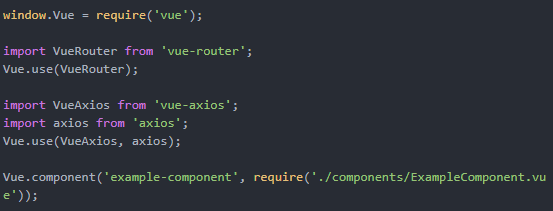
As shown above, the Vue component will get compiled with Laravel mix. This lets us use the component in any blade file in the application. You can simply use the component in the blade file with ‘<example-component>’ tag. example-component is the name you provide when registering the component with Vue.component command.
For further Vue and Blade configurations, have a look at it from Vue.js and Laravel documentation.
Vue With Inertia
Inertia is a library that acts as a glue between your frontend and backend, acting as a connector between a large selection of frontend and backend frameworks. Inertia makes it easy to make single page applications with Vue and is beginner friendly and accessible to those used to building SSR ( Server-Side-Rendered ) applications.
For a gentle introduction into building powerful web applications with Inertia view the Laravel documentation.
Vue 3
Vue 3 was released in late 2020 bringing with it a new API to build components with alongside a slew of new features. The Composition API was the major change between Vue 2 and Vue 3 and hoped to improve better logic reuse, more flexible code organisation and better type inference. This decision has somewhat split the community due to the large number of existing libraries and the overall ecosystem of Vue 2.
You can have a look at it from the video below to learn more about Vue 3.
Conclusion
In conclusion, Vue.js is a powerful framework to use as the front-end for your Laravel application. As mentioned above, there are many benefits you could use instead of using some other framework.
Above all, Laravel comes with Vue.js included, which makes it much easier to integrate.
Below figure is a demo of one of our applications which we developed using Vue and Laravel.
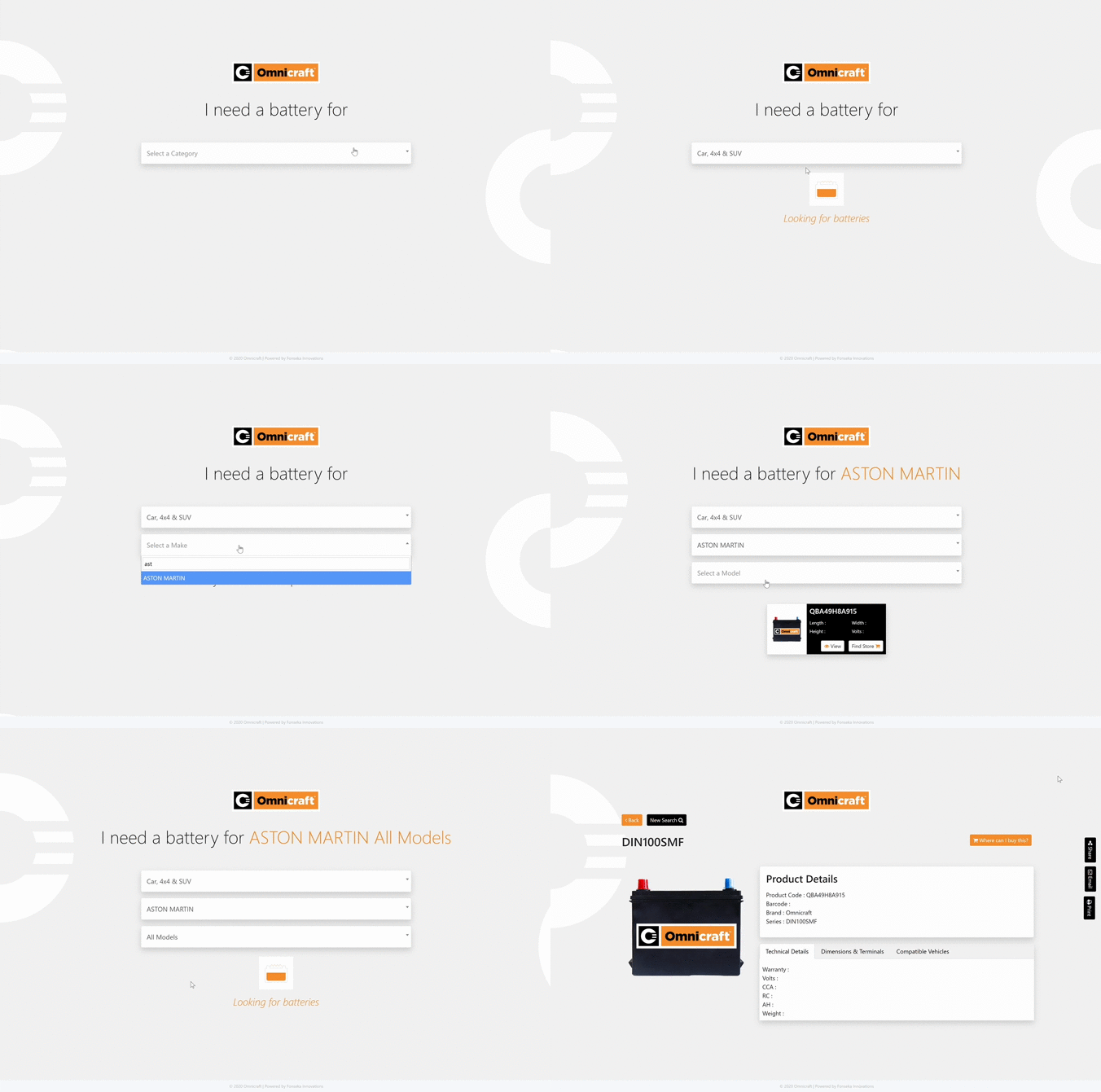
At Fonseka, we have been using Vue.js and Laravel to build some powerful tools and web applications. If you have any innovating ideas or even some old web application that needs a good revamp, contact us.
References
- https://vuejs.org/
- https://appdividend.com/2018/11/17/vue-laravel-crud-example-tutorial-from-scratch/
- https://laravel.com/
- https://laracasts.com/series/learn-vue-2-step-by-step
- https://www.youtube.com/channel/UCa1zuotKU4Weuw_fLRnPv0A
- https://www.vuemastery.com/
- https://2019.stateofjs.com/front-end-frameworks/
- https://2022.stateofjs.com/en-US/libraries/front-end-frameworks/
- https://vuejs.org/v2/guide/comparison.html