




Make use of Visual Studio Code (VSCode) extensions to push your development process.
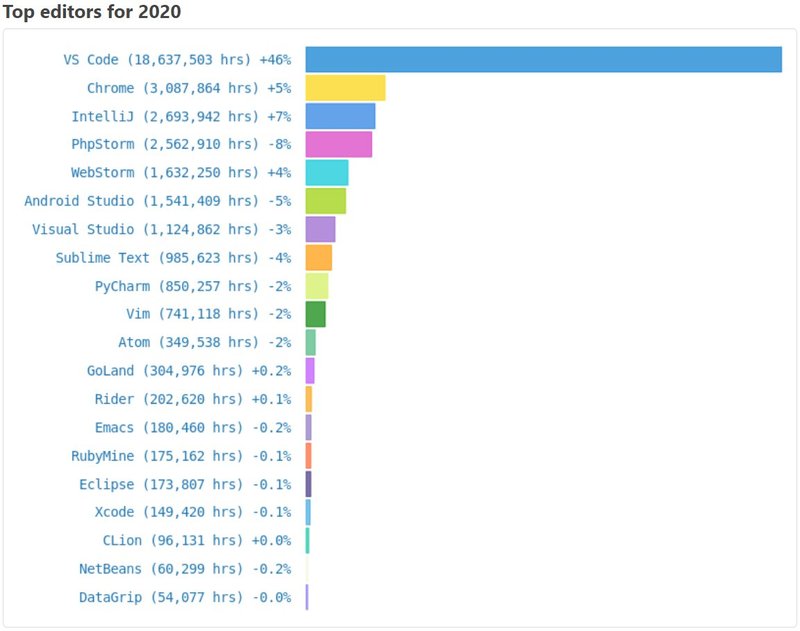
Visual Studio Code has been one of the most used code editors in recent years, according to Waka Time. From my experience of using a number of editors, I always come back to VSCode for web development. VSCode, while being lightweight and cross-platform, has a large pool of extensions that could greatly boost productivity, in web development especially.
As a junior software developer, reducing context switching during development is always a plus. Here is an unordered list of 9 Visual Studio Code extensions. These extensions make web computing much more enjoyable and faster.
List of VSCode Extensions
Auto Close Tag

If you are a web developer or frequently work with HTML/XML tags in pure HTML/CSS or modern frameworks like React, Angular, Vue and so on, this extension will be helpful and extremely easy to use. When an HTML/XML tag is opened, the extension will automatically close the corresponding tag for you.
This will save you time having to manually close tags and prevent missing closing tags which is an irritating task to find them and such time could be used to continue your development.
Color Picker
For frontend development, another simple but yet really useful extension that would help to boost your development progress is Color Picker. In many instances, you would have to work with colours in hexadecimal format, which can be difficult to identify its colour from the hex code.
This extension provides a helper GUI with colour code generation that allows users to see the colour and have the ability to convert its format between hexadecimal, RGB, HSB and so on. This would save you time from leaving the editor and searching up the colour codes.
Guides

Continuing with VSCode Extensions, Guides is another one of my favourite simple extensions but can also be very useful. Guides adds indentation guidelines to your code. This makes reading codes a lot easier, can greatly improve your code quality and productivity.
Path Intellisense

There are a few extensions that are must-haves in VSCode, and Path Intellisense is one of them. One of the most tedious tasks in front and backend development is manually finding the file directory path of the file to import, and this extension will help you autocompletes file paths as you type, which is similar to navigating between directory in terminal using cd (change directory). This reduces another context switching task and lets developers focus on their development, thus, it improves productivity.
Docker

If you are a web developer or have developed and deployed a web application, you probably have heard of Docker. If not, Docker is a tool designed to make the deployment process easier using containers. With containers, it allows developers to pack an application with all of its dependencies and libraries, and deploy it as one package. This process is called dockerize.
Generally, developers use Docker CLI to dockerize their applications or use Docker Desktop software that can be downloaded from the Docker website. These are used to execute commands such as building, pushing and pulling an image and so on. Instead, you can use the Docker extension to perform such operations with a simple UI. It also has an overview of your Docker folder and paths. Compared to the Docker CLI and Docker Desktop, this extension provides a user-friendly and quicker way to access Docker.
Project Manager

Project Manager is an extension that allows developers to switch between projects easier without using the traditional option through file explorer from the VSCode editor’s File menu. It provides features such as auto-detecting Git, Mercurial or SVN repositories, folder or workshop saving option, identifying deleted/renamed projects, a status bar showing the current project and a dedicated sidebar. With the auto-detect repositories and favourite features, you can easily track your current active project. You can also quickly switch between projects especially when you are working on a full-stack project.
REST Client

For web development, Postman is one of the most popular API development tools to be used for REST, SOAP and GraphQL queries testing. However, if you are developing a simple project or wanting to test a response for an HTTP request, the REST Client extension might be a better option. The extension allows developers to send HTTP requests and view the responses directly in Visual Studio Code. For such tasks, it saves time from switching between VSCode and Postman.
GitLens

To finish off this VSCode Extensions list, let’s talk about GitLens. Git is a popular version control software that can be used for code storing and keeping track of changes made to a file or a series of files. GitLens is an extension of Git. This plugin provides full Git functionalities while also keeping track and displaying commit history for each line of code. The commit history shows the author, commit information and created/modified timestamps when clicked on a line of code.
This allows developers to easily recognize the changes in their code, especially in a big project involving many developers. Besides GitHub, GitLens also supports other remote providers such as GitLab, Gitea, Bitbucket and Azure DevOps. Given the GUI and features provided by this extension, developers do not need to switch between the terminal and VSCode. The Git CLI lets them focus on their project development.